免费试用 Semrush One
统一 SEO 权威和 AI 可见度的领先平台。
立即获取门票
为期一天。实战策略。专为志在必得的营销人打造。
2026 年 10 月 13 日英国伦敦
知识库
Semrush 工具箱
SEO
Organic Rankings
Researching SERP Features
SERP Features: Reviews

SERP Features: Reviews

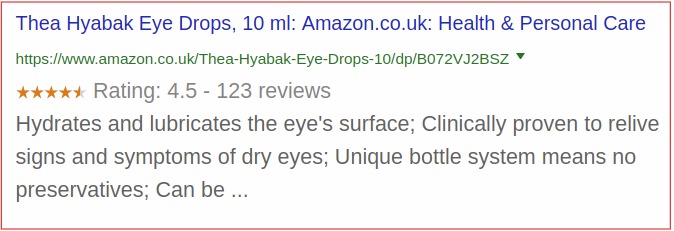
When someone searches for a business or product, review stars and ratings can appear in the SERP next to organic search results. Reviews can include the average rating, the number of reviews, and even a few examples of reviews. This information can be pulled from a variety of sources, including Google My Business, Yelp, and TripAdvisor.

Here’s what they look like on Google’s desktop SERPs:

What Reviews look like on desktop results

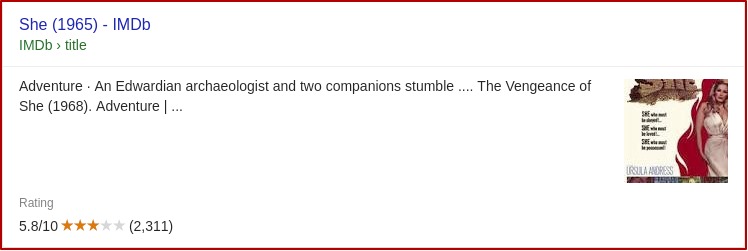
And on mobile results:

What Reviews look like on mobile results

How to Get Reviews on Your Search Results

You can gain reviews on your organic results in a couple of ways.

  • If you operate a business, setting up a Google Business Profile will allow you to collect online reviews that will accompany your website’s listings
  • You can also make sure your business has profiles on business listing sites like Yelp and YellowPages that allow people to leave reviews
  • Implementing reviews with review schema markup on your own website can lead to review stars appearing next to your search results.

For more tips, read this from our blog: Understand Google Review Snippets to Optimize Your SEO.

How Semrush Collects Data about Review SERP Features

  • When we scan a keyword’s SERP, we identify whether or not reviews are present anywhere on the results page. 
  • If reviews are present on the results page but the queried domain does not have this feature beside its result, its icon will appear gray in the SF column
  • If reviews are present as a part of the queried domain’s organic search result, its icon will appear blue beside the number in the Position column

To learn more about this SERP feature and others, read our SERP Features Guide.